




Solving nginx's HTTP/3 Architecture Problem: Angie's Experience and the Magic of eBPF#
How Angie 1.11 addressed the fundamental shortcomings of the HTTP/3 implementation in nginx: from simple hashes to building a full-fledged accept() equivalent for QUIC using BPF programs.
To the end user, switching from HTTP/2 to HTTP/3 may appear to be simply replacing TCP with UDP in the config. But for server software with a multi-process architecture, this step becomes a real headache. The classic accept() scheme that has underpinned TCP connection handling for years simply does not exist in the QUIC world. Packets arrive on a UDP port, and the OS kernel no longer knows which worker process should receive them.
In the original nginx, this resulted in HTTP/3 support remaining "experimental" and limited for a long time: it suffers from session disconnects and service degradation during configuration reloads. For many, this has been a dealbreaker for deploying the protocol in production.
In this article, we describe how Angie 1.11 addresses these fundamental shortcomings. We did not simply add protocol support — we rethought the way the server interacts with the kernel. The journey from simple hashes to building a full-fledged accept() equivalent for QUIC using BPF programs allows us to say: Angie's HTTP/3 implementation is complete, free of nginx's "teething problems", and fully ready for production use in high-load environments.
Welcome under the hood of modern data transport.
---
Now I hand it over to Vladimir, one of the developers of the HTTP/3 module in nginx, who is the author of the new mechanism and will share all the details. An nginx developer since 2012 and an Angie developer since 2022. The thing is, HTTP/3 runs on top of the QUIC protocol, which is based on UDP, unlike previous HTTP versions that ran on top of TCP. In this article, we will not discuss how HTTP/3 differs in terms of semantics — there are no revolutions there. It is still URL requests with various methods, arguments, and headers, and responses with familiar status codes. Even though the wire representation has changed (it is now binary rather than text-based), the essence remains the same. What has truly changed, however, is the transport layer and how the application layer interacts with the transport protocol. So, UDP. This means we are dealing with packets that may be lost or arrive out of order. There is also no flow control. In previous versions, all of these (and many other!) concerns were handled by the TCP stack, which is typically implemented in the OS kernel. Now the QUIC protocol takes on this responsibility. It handles packet numbering, tracks delivery order, and controls both the data transfer rate and packet sizes. Furthermore, it ensures data integrity through integrated cryptography. And today, all of this runs not in the kernel but in user space. It is possible that someday QUIC will make it into the kernel (such projects already exist) and we will return to the old paradigm, but for now Angie implements the entire QUIC and HTTP/3 stack on its own. Thus, adopting QUIC means incorporating a large body of networking code tightly integrated with TLS into your application. The latter imposes additional requirements on the SSL library being used. The level of support for the required primitives varies widely across libraries, which can sometimes even lead to network-level incompatibilities. Beyond the complexity, QUIC also brings new capabilities. For example, it can maintain connections when the client's or server's IP address changes (migration), provides greater privacy, enables fast session resumption (0-RTT), and supports truly independent data streams within a single connection. This is a significant improvement over HTTP/2, where a single lost packet in one stream would stall all others because they shared a single TCP connection (the Head-of-Line Blocking problem). Due to the architecture's reliance on multiple processes for multi-core systems, implementing the QUIC protocol presents challenges. To understand these, we first need to look at how client handling works in a TCP server. Consider this simple configuration: First, the master process starts, reads the configuration, and creates a
listen socket. It then uses fork() to spawn two worker processes (one per
core). The worker processes wait for new connections in an infinite loop by
calling the accept() system call. When a client connects, one of the
processes receives a new client socket, which it uses for communication. The
OS kernel ensures that data from the client reaches the correct worker process
through this specific socket. To go further, it is important to consider two more procedures that significantly
affect operation: loading a new configuration and upgrading the binary without
service interruption (graceful reload and graceful upgrade). If you need to
change Angie's settings, you certainly do not want to stop the server and
drop existing connections. The same applies to upgrading the server version
itself. How is a configuration update related to the TCP server? In Angie, to update settings, the user edits the configuration file and asks the system to apply the changes. At that point, the master process reads the new configuration and starts new worker processes that begin using it. The old processes continue to serve existing connections but no longer accept new requests because they close their listen sockets. At any given time, there may be multiple sets of worker processes, each operating with its own version of the configuration. New connections are handled only by the current worker processes. For example, here is what you might see during a configuration update: We see a master process running as the superuser and four worker processes running without privileges. The original processes were using configuration #1, while the new ones use configuration #2. One old process is still active — it has unfinished client connections. The binary upgrade process is conceptually similar, but in this case a new master process is started (from the new executable), which spawns its own set of worker processes. The old and new masters run in parallel, each with its own set of worker processes. Existing connections continue to be served by the old processes until they finish, while new connections may land in either instance of the system (both old and new worker processes). Here is what the process table might look like during the transition: Here we have two master processes, each with its own set of worker processes,
with the second one already using the second generation of configuration. You can always check the configuration generation in Angie via the API. In both of these scenarios, the rule holds: existing connections continue to
be served by their original worker process, while new connections can be
accepted by the new processes. All of this is possible because the kernel
handles connection establishment, and new processes can claim connections
from it. Existing connections operate through already-created sockets that
belong to a specific process, so there is no room for confusion. What changes with the move to QUIC? Now it is the Angie process, not the
kernel, that is responsible for accepting incoming connections. Instead of a
ready-made established connection obtained through an accept() call, we
simply receive UDP packets (from the listening socket). Their contents must
be correctly processed and attributed either to existing connections, to new
connections, or to noise. Previously, there was an atomic way to accept a client connection (accept():
the kernel performs the TCP handshake and only notifies the application upon
success), but now we face a problem. To establish a connection, we need to
exchange a series of packets with the client within the same worker process.
However, a return packet may end up being received by a different worker
process, since it listens on the same socket. As a result, in the basic
scenario QUIC would only work with a single worker process (and even then with
caveats), which is obviously unacceptable for high-performance systems. So we have multiple processes listening on the same port and reading UDP
packets from it. A packet read by one process may actually be intended for
another. Even if we determine that a packet is "not ours", we still don't
know where to forward it. This problem needs to be solved. To solve it, we can use the reuseport socket option (which enables
SO_REUSEPORT or
SO_REUSEPORT_LB). Although its name and history can be misleading, on
modern systems it allows multiple processes to share an address:port pair.
Each process must have its own socket. In other words, instead of "1 socket
for N processes", we switch to "N sockets for N processes". The kernel handles distributing incoming packets across sockets: it hashes
packet data (including the client's IP address and port) and uses the result
to select a socket from the reuseport group. Thanks to this, an unchanged
client always lands on the same socket and therefore in the correct worker
process. Using the reuseport option in the listen directive: While this approach works, it is not ideal: Uneven distribution: the distribution of clients across the IP address
space may not be random, causing the load to be spread unevenly across
worker processes. Address changes: a client's IP address may change either due to QUIC
migration mechanisms or NAT behavior. Update process: complex scenarios involving configuration or binary
updates bring back the original problem — socket sharing between multiple
sets of processes. This happens because after the master process calls
fork(), sockets are inherited and shared between different generations of
worker processes. To address these problems, the BPF module was introduced.
This is a Linux-specific technology that
allows an application to intervene in the kernel's socket selection process for
an incoming packet. This functionality extends the capabilities of reuseport:
instead of simply distributing packets by hash, it allows loading a custom
socket selection algorithm into the kernel. The diagram below illustrates how
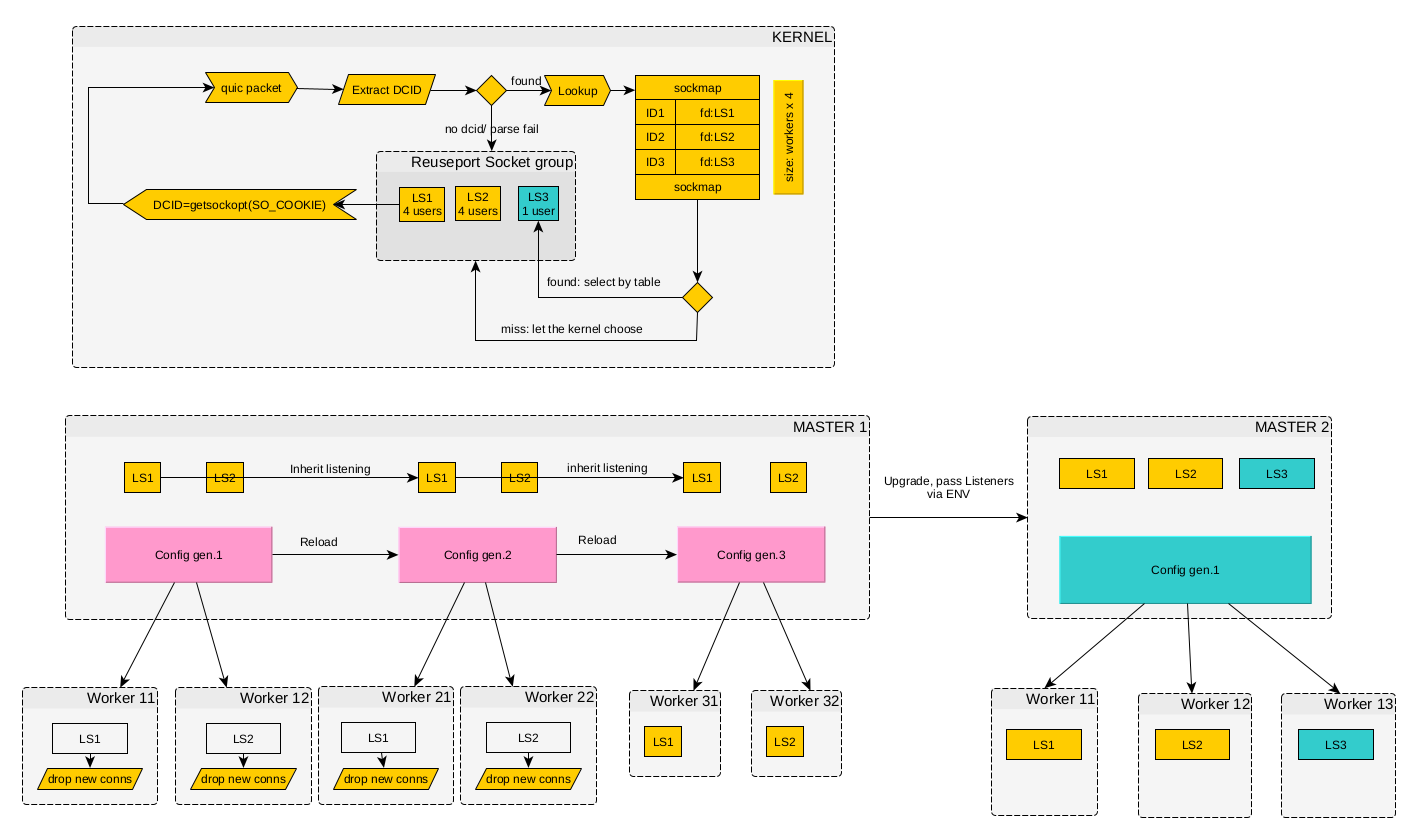
this works. Binding packets to listening sockets via BPF in nginx (click the diagram to enlarge)# How does this algorithm work? In the first version (still in nginx), for
simplicity, client QUIC connections were bound to the worker process number.
This was implemented as follows: each QUIC packet contains a Destination
Connection ID (DCID) — a
destination identifier that may change during the lifetime of a connection. We
used this property to encode the socket identifier (obtained via SO_COOKIE)
directly into the DCID. The BPF module created a table in the kernel that mapped sockets to their
identifiers. The table size was fixed and determined by the number of processes
in the original configuration (with a small margin). The program analyzed each
QUIC packet, extracted the DCID, and used it to determine which socket should
receive the packet. New packets (without a DCID) could be directed to any
socket. Enabling BPF is done by adding the quic_bpf on directive to the
configuration: In essence, this is analogous to the sticky cookie mechanism in load balancers. This solved the client migration problem, but still performed poorly in complex scenarios. Moreover, this scheme exposed internal worker process implementation details to the outside world. It also broke down when new master processes were started during binary upgrades. And during configuration reloads, new packets could still end up at old worker processes. To minimize the negative effects, old worker processes were made to either not respond to new connection requests or respond with a retry packet. This was based on the assumption that the client would make several attempts, and over time (once its port changed or the old processes terminated) it would reach a new worker process where it could successfully establish a connection. Of course, this solution was not ideal and led to temporary service degradation after a configuration reload. At some point, it became clear that each client needed its own socket — just
like with TCP. In effect, we needed an accept() equivalent for QUIC. This
approach was implemented using BPF in recent versions of Angie. It solved the
problems that arose during configuration and binary updates. The diagram below
shows the new approach — as you can see, it is considerably more complex than
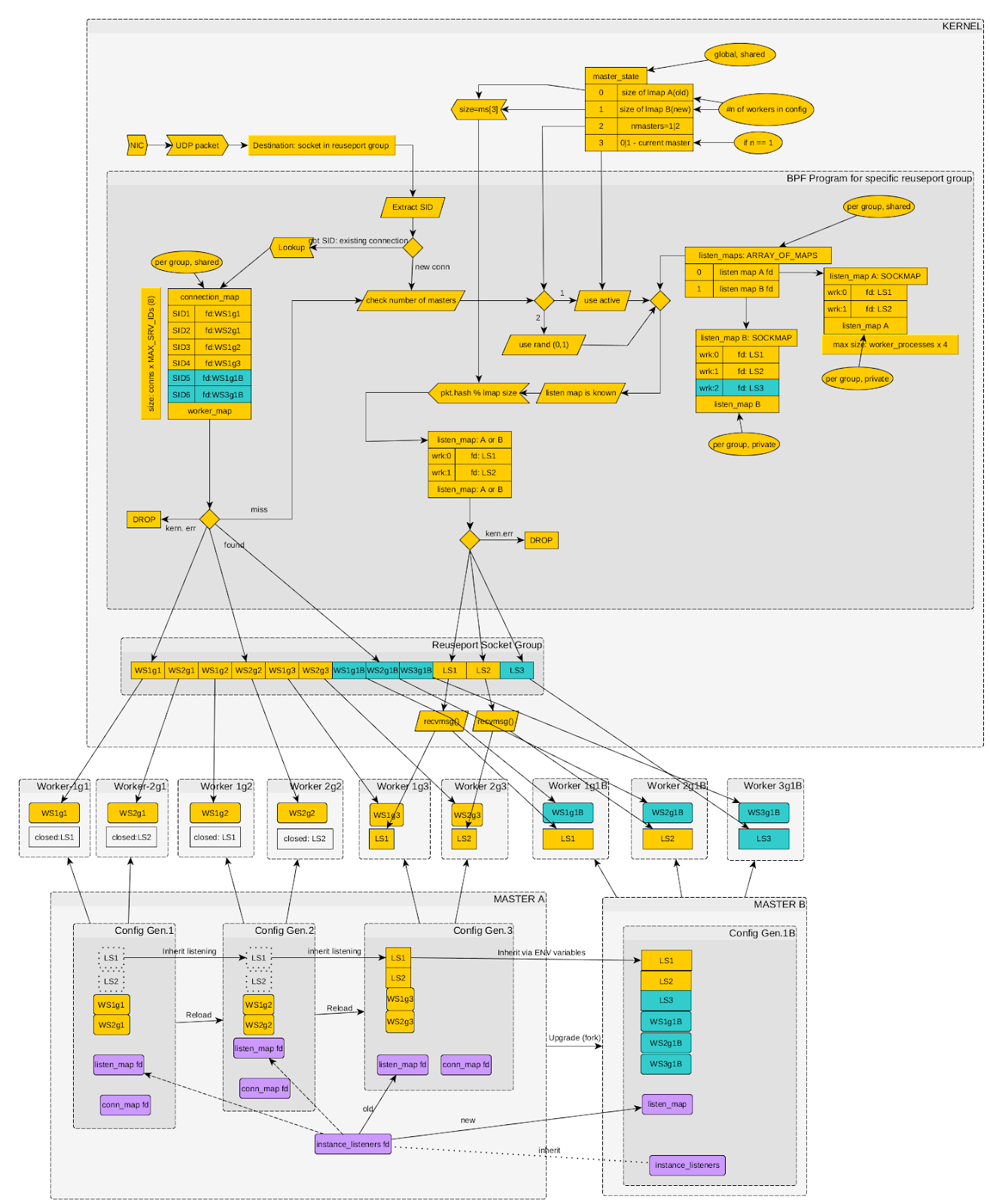
the previous one. Binding packets to listening sockets via BPF in Angie (click the diagram to enlarge)# Now the BPF module is aware of how many Angie instances are running and how many worker processes each one has. Each instance maintains a table of accepted connections (mapping unmodified DCIDs to specific client sockets). In addition, the kernel maintains a table of listening sockets for each instance. Every packet destined for a port that Angie listens on with the quic option first passes through the BPF program. It runs a socket (and therefore worker process) selection procedure by checking conditions in sequence: Session ID present: if the packet contains a known session identifier, the socket of the existing connection is selected. New connection: if no session is found, the packet is treated as a new connection request. Instance selection: for new connections, an Angie instance is chosen at random to handle them (if more than one master is running). Socket selection: the client's hash is then used to select a listening socket from that specific instance. Now, when a worker process receives a new connection request on its listening socket, it creates a new client socket and adds an entry with the corresponding DCID to the BPF table. This guarantees that all subsequent packets will be delivered to that exact socket. When an instance shuts down, the worker process closes the listening socket, removes its entries from the BPF tables, and stops accepting new requests, while existing connections continue to work without interruption. During a configuration reload or new master launch, both old and new processes correctly update the kernel tables, allowing the BPF module to route traffic accurately in any situation. An important note: by enabling the BPF module in the configuration, you are not simply changing Angie's internal settings — you are also modifying global kernel objects (attached to the reuseport socket group). Once BPF is enabled, it cannot be disabled without a full process restart. Even if you remove it from the new configuration, the program loaded by the previous version will remain in the kernel. The active connections table size is limited and calculated using the formula: N = worker_connections x MAX_SERVER_IDS, where: worker_connections is the value of the corresponding directive in the configuration at the time the BPF tables were created; MAX_SERVER_IDS is the maximum number of QUIC Server IDs per connection (currently a preset value of 8). A clarification is needed here: the Connection ID in the QUIC protocol may change multiple times during a session to make it harder to track the existence of a connection (for enhanced privacy). Therefore, at any given moment, more than one ID may be associated with a particular connection. And MAX_SERVER_IDS defines the limit on the number of such simultaneously active identifiers. In summary, the transition to HTTP/3 is not simply a protocol version change — it is a fundamental shift in the web data transport paradigm. The main challenge lies not in HTTP semantics, which have remained the same, but in the need to adapt server software to a fundamentally different connection model based on QUIC and UDP. Here are the key architectural differences when using HTTP/1, 2, and HTTP/3 in Angie today: HTTP/1.1 HTTP/2 HTTP/3 Representation Text Binary Binary Transport TCP TCP QUIC over UDP Security TLS over TCP TLS over TCP QUIC (TLS integrated into the protocol) Network stack (transport layer) Kernel implementation (SOCK_STREAM sockets) Kernel implementation (SOCK_STREAM sockets) Implemented in Angie (on top of SOCK_DGRAM sockets) Streams within a connection None Present but may block each other (HoL) Streams are independent Encryption Optional Optional* Integral part of the protocol Process selection for connections Chosen by the kernel (via the accept() system call) Chosen by the kernel (via the accept() system call) Chosen by the BPF module upon receiving a UDP packet, based on connection data from Angie Protocol selection by client Default port 80, ALPN list for TLS on port 443 Default port 80, ALPN list for TLS on port 443 Alt-Svc header in the response, protocol list in DNS records Compatibility All supported OSes All supported OSes BPF module is available only on Linux; on other OSes, support is limited (single worker process, configuration changes may interrupt existing connections) Unlike TCP, where the operating system kernel takes on all the complexity of managing connections and balancing them between processes, in the QUIC world this responsibility falls on the application itself. As we have seen with Angie, this gives rise to a number of non-trivial challenges: from initial packet balancing to supporting complex scenarios such as connection migration and seamless configuration or binary updates. The evolution of solutions in Angie — from the primitive SO_REUSEPORT approach inherited from nginx to the sophisticated system with individual client sockets and multiple BPF tables — clearly demonstrates how new standards are integrated into time-tested multi-process architectures. The key achievement was creating an accept() equivalent for QUIC using eBPF, which allowed the system to return to the familiar and reliable connection handling model. Despite the increased complexity and dependence on Linux-specific capabilities, this approach paves the way for stable, high-performance HTTP/3 operation in high-load environments.
Vladimir Khomutov#
Why HTTP/3 Is Nothing Like HTTP/{1,2}#
How a TCP Server Works#
worker_processes  2;
events { }

http {

    server {
        listen 127.0.0.1:8080;
        location / { return 200 "Hello, world\n"; }
    }
}
$ ps aux|grep angie
root       26092   angie: master process v1.11.0 #1 [./sbin/angie]
nobody     26093   angie: worker process #1
nobody     26094   angie: worker process #1
nobody     26095   angie: worker process #1
nobody     26096   angie: worker process #1

# kill -HUP `cat logs/angie.pid`

$ ps aux|grep angie
root       26092   angie: master process v1.11.0 #2 [./sbin/angie]
nobody     26094   angie: worker process is shutting down #1
nobody     27084   angie: worker process #2
nobody     27085   angie: worker process #2
nobody     27086   angie: worker process #2
nobody     27087   angie: worker process #2
# ps aux|grep angie
root      101664  angie: master process v1.11.0 #1 [./sbin/angie]
nobody    101665  angie: worker process #1
nobody    101666  angie: worker process #1
nobody    101667  angie: worker process is shutting down #1
nobody    101668  angie: worker process #1
root      101676  angie: master process v1.11.0 #2 [./sbin/angie]
nobody    101753  angie: worker process #2
nobody    101754  angie: worker process #2
nobody    101755  angie: worker process #2
nobody    101756  angie: worker process #2
How a UDP/QUIC Server Works#
Binding Clients to Processes via reuseport#
worker_processes  2;
events { }

http {

    ssl_certificate ...
    ssl_certificate_key ...

    server {
        listen 127.0.0.1:8080 quic reuseport;
        location / { return 200 "Hello, world\n"; }
    }
}
Binding Clients to Processes via BPF#
worker_processes  2;
events { }

quic_bpf on;

http {

    ssl_certificate ...
    ssl_certificate_key ...

    server {
        listen 127.0.0.1:8080 quic reuseport;
        location / { return 200 "Hello, world\n"; }
    }
}
Using Client Sockets#
Configuring the BPF Module#
Conclusion#